
A couple of weeks ago I was looking at a test pixel we set up for a client, and the numbers made no sense.
One event had 274,022 browser events in a week and 159 server events.
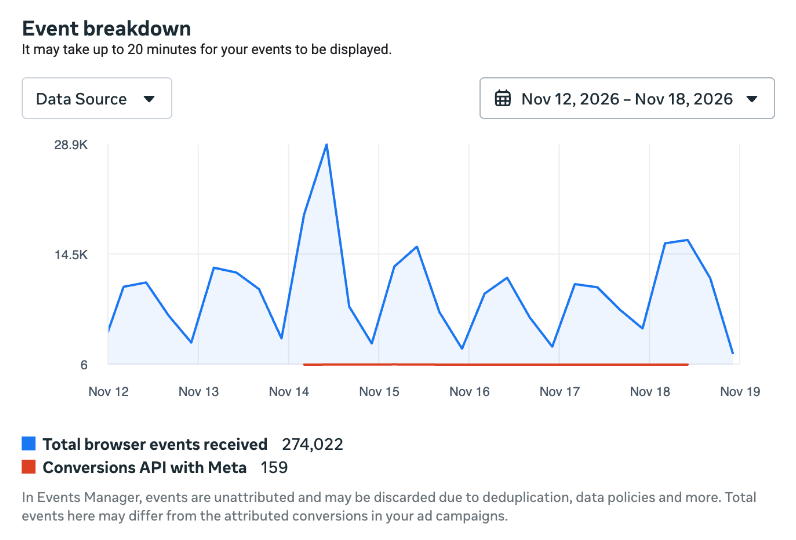
The pixel was on “Conversions API with Meta”, Meta’s one-click setup for the Conversions API (CAPI). It’s free, and it’s supposed to send your web events through a server-side connection, without you hosting a server or writing any code.
Meta’s documentation on it is pretty thin, so we read the pixel’s code and watched the network tab. It’s not really server-side. Every time the pixel fires, the browser also sends the same event to a server that Meta spins up for you (Meta calls it a gateway), and Meta counts that copy as the server event.
And that explains the numbers. The client’s site had a Content Security Policy (CSP), which is basically a list of the servers a page is allowed to talk to, and Meta’s gateway wasn’t on it. So the pixel’s normal requests went through: those are the 274,022 browser events. The browser blocked almost all of the copies, and only 159 made it to Meta as server events.
How it works
Let me walk you through it.
- You get opted in. Meta’s GTM template has a checkbox that comes ticked by default, and creating a pixel in Events Manager can opt in your whole business. That’s how it happened to us.
- Meta gives each pixel its own gateway URL. You can see it in the pixel’s config file, the one every visitor’s browser downloads from
connect.facebook.net. - Every time the pixel fires, the browser sends the event to
facebook.com/trlike it always did, AND sends the same event to that gateway. - Meta counts that copy as the server event. Same event ID, so it dedupes.
There’s no server of yours anywhere in this. Here’s that next to a first-party setup, where the second copy goes to your own server.
Conversions API with Meta
A first-party setup
It’s not even new. Meta has had a product called Conversions API Gateway for years, where you host the gateway on your own cloud account, and their docs say the pixel “will send events to both Meta and the Conversions API Gateway”. This works the same way, with Meta doing the hosting. Their code still calls it capig_pixel (CAPIG is short for Conversions API Gateway).
Where to look for it
If you don’t live in the network tab, this is the quick way to check any site.
Open connect.facebook.net/signals/config/PIXEL_ID in your browser (with your own pixel ID) and search for “openbridge”. The URL next to endpoint is the gateway.
It looks like this (trimmed):
config.set("PIXEL_ID", "openbridge", {
  "endpoints": [{
    "endpoint": "https://xx-<32 characters>.ecs.us-east-2.on.aws/",
    "enrichmentDisabled": true,
    "fallbackDomain": "https://<backup>.cloud.run",
    "alwaysRetry": true
  }]
});
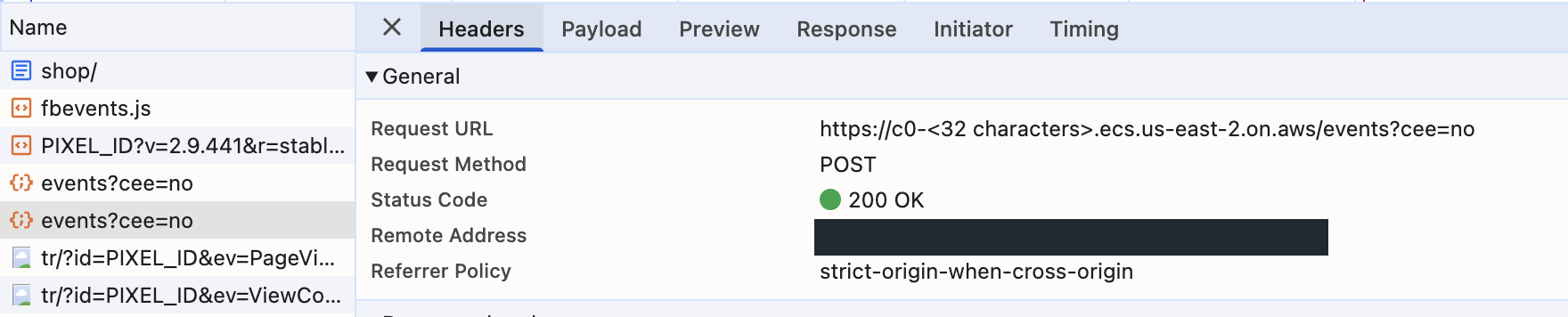
Then load your site with the network tab open and filter by /events. You’ll see a POST going to that URL every time the pixel fires.
In GTM, the checkbox is inside the Meta pixel tag, under “Meta-enabled Conversions API integration”. If you use Meta’s GTM template you’re probably opted in already, because the checkbox comes ticked by default. The fine print says you’re authorizing Meta to set this up on your behalf.

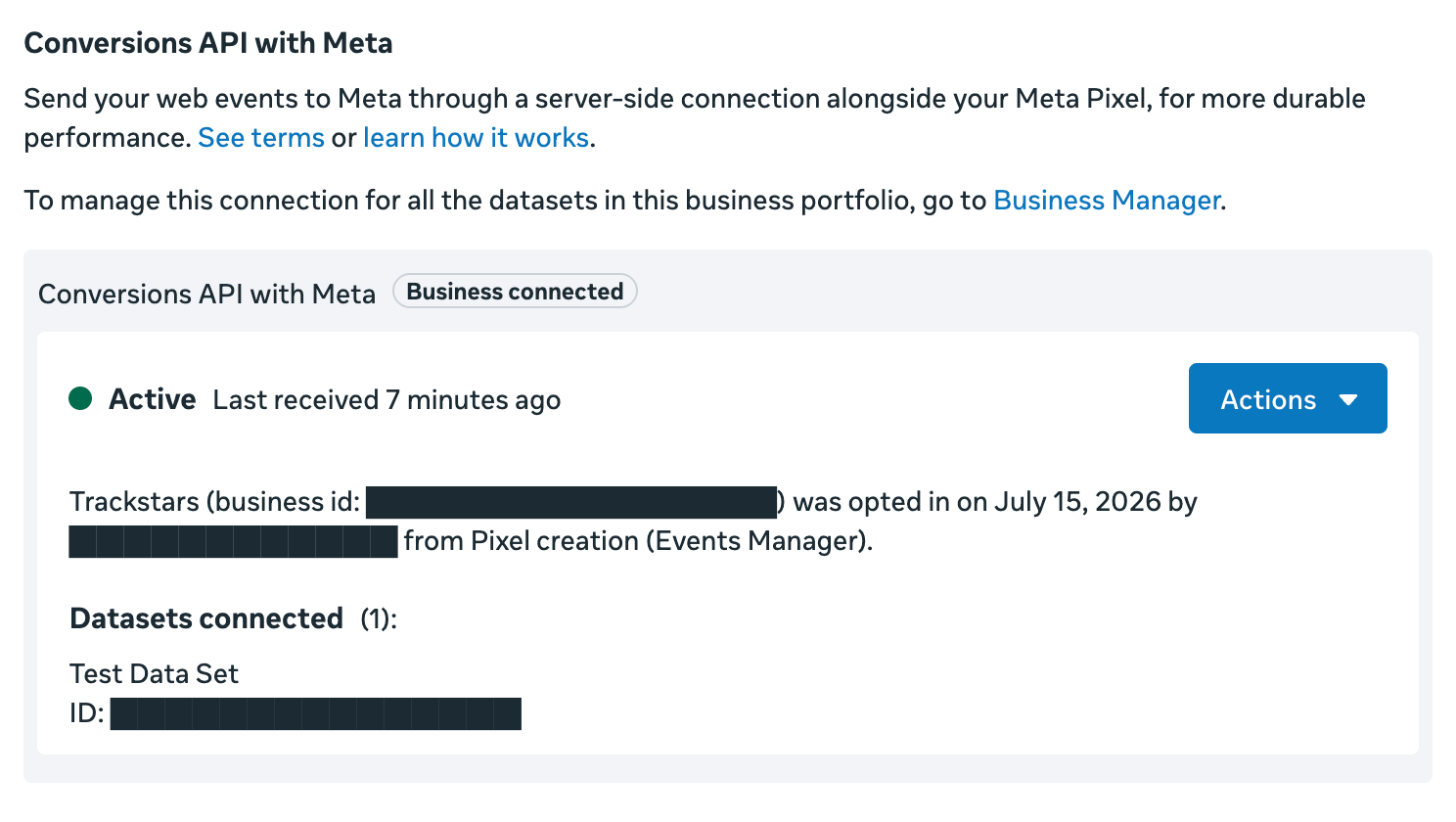
In Events Manager, go to your dataset’s Settings and scroll to the Conversions API section. It shows up as “Conversions API with Meta”, with a status next to it.
That same box tells you when your business was opted in, by whom and how. Ours says it happened back in July, “from Pixel creation (Events Manager)”. So it’s not just the checkbox in GTM. We got opted in when one of us created a pixel in Events Manager, and Meta’s help page says creating a pixel that way can connect every dataset in your business.
Where it lands
The gateway is not on your domain. It’s not on a Meta domain either.
On the pixels I checked, it’s an Amazon server, with a URL like xx-<32 characters>.ecs.us-east-2.on.aws. There’s also a backup URL on Google Cloud in case the first one fails. (On one pixel it was the other way around, Google first and Amazon as the backup.)
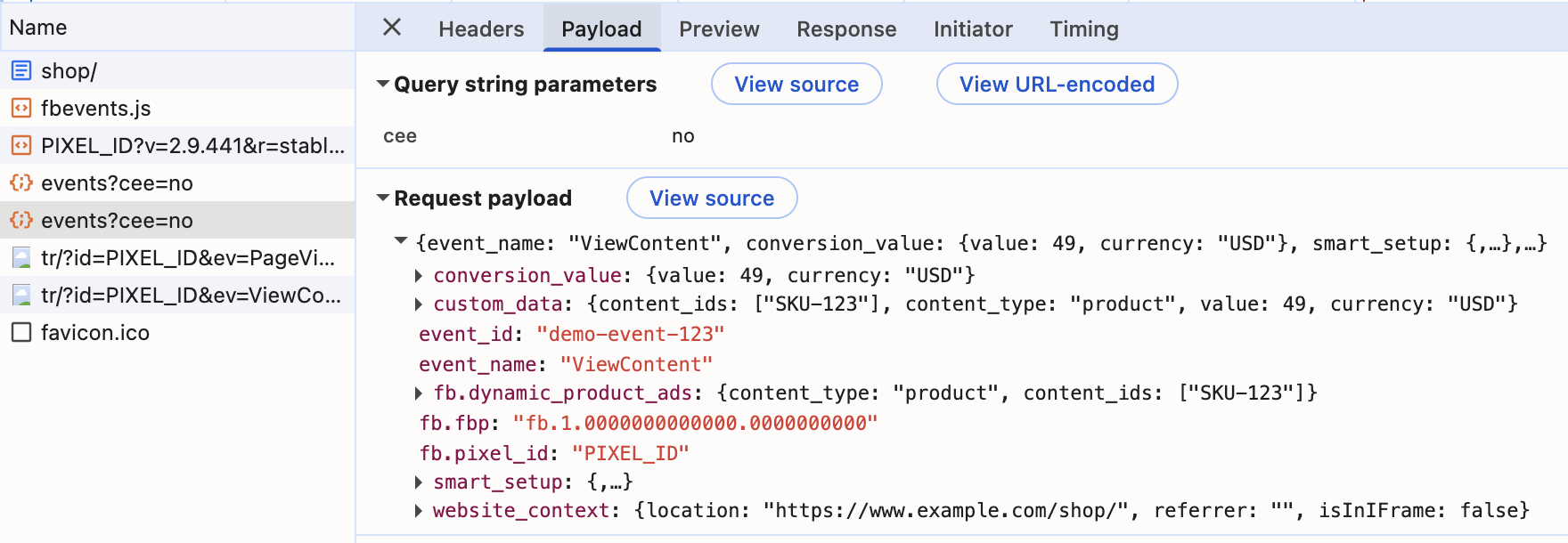
And the payload looks quite familiar. It’s JSON with the event name, the event ID, the event parameters, the _fbp and _fbc values and hashed customer details, if the pixel has them. Pretty much what you’d expect from a Meta request.
The gotcha
Back to that test pixel. The site’s Content Security Policy (CSP) was blocking the copies, and nothing in Events Manager told us. It just showed browser events and almost no server events.
What does this mean for compliance?
We don’t give legal advice, so read this as a technical take.
First of all, you still need the pixel to load. The copy is a command from the pixel. If your banner blocks the pixel when someone opts out, nothing gets sent to the gateway either. And if your banner doesn’t block the pixel, the data is now going to two places.
Second, it doesn’t reduce your exposure the way a proper first-party tagging setup can. There, the second copy goes to your own server, through your own domain or a subdomain, and your server sends it to Meta. You can build that yourself, or use a platform like Elevar, which does it for you on Shopify and sends the events through your store’s own domain.
Conversions API with Meta gives you none of that: you can literally see the event going to an Amazon server in the network tab, and the payload looks like a Meta payload. Anyone looking for evidence on your site will find it as easily as they find the pixel.
So this one doesn’t change your exposure at all. Treat it exactly like the pixel.
What about ad blockers?
The only benefit I could think of is not really a compliance benefit, it’s a tracking benefit. Ad blockers know facebook.com, but they might not understand that you’re also sending the event to some Amazon server.
But honestly, I don’t even think that’s much of a benefit. The pixel still needs to load and the event still needs to fire. It would be strange for an ad blocker to let the pixel load and then block just the events, instead of blocking the whole thing.
We checked the block lists, and that’s what they do. EasyPrivacy, the list that uBlock Origin and Brave use by default, blocks the pixel’s script itself (fbevents.js). AdGuard’s list does too. If the script doesn’t load, there’s no pixel, and no copy either.
The Amazon URLs weren’t on those lists when we looked (November 19, 2026). But the blockers are paying attention. Both lists already block one of Meta’s gateway domains (gw.conversionsapigateway.com), and AdGuard has 163 self-hosted gateways on its list.
What if you already have a CAPI integration?
This doesn’t affect your integration, whether it’s your own server-side setup or a platform like Elevar, as long as the same event ID goes to the browser side, the server side and the gateway. Meta dedupes on the event ID, so the event still counts once.
The gateway copy carries the same event ID your pixel sends, so it lines up with your own server event too.
So it’s fine to leave both on. But this definitely doesn’t replace your own setup, which is a lot stronger. It can send a purchase straight from the order, even when the browser never fired. This one only repeats what the pixel already sent.
Should you keep it on?
If your consent setup already controls your pixel, I’d keep it on. It’s free and it doesn’t hurt.
Just add the gateway URL to your CSP if you have one, and to wherever you keep track of the third parties on your site.
What I wouldn’t do is count this as server-side tracking. If you want what a first-party setup gives you, you still have to build it, or use a platform that does it for you. On Shopify, we personally recommend Elevar for tracking performance (we’re an Elevar partner).
And if you’re not sure your banner controls your pixel, start there. Go click “Reject” on your own site and see what still fires.
Sources
- Meta for Developers: Conversions API, which mentions the one-click setup
- Meta for Developers: Conversions API Gateway
- Meta Business Help Center: How to connect and disconnect Conversions API with Meta
- Meta’s Google Tag Manager template for the pixel (
template.tpl) - Meta’s pixel library: fbevents.js
- Blocker lists: EasyPrivacy and AdGuard Tracking Protection
- Elevar’s docs: how its requests reach its servers on Shopify and its Meta destination
Is Conversions API with Meta real server-side tracking?
Not really. The event still starts in your visitor’s browser. The pixel sends it to Meta and also sends a copy to a gateway that Meta runs, and Meta counts that copy as the server event. If the pixel doesn’t fire, nothing gets sent.
I use my own server-side setup or a platform like Elevar. Does this cause any issues?
No, as long as the same event ID goes to the browser side, the server side and the gateway. Meta dedupes on the event ID, so the event still counts once. It’s fine to leave both on, but it doesn’t replace your own setup. It only repeats what your pixel already sent.
How do I know if it's on for my pixel?
In Events Manager, open your dataset’s Settings and look for the Conversions API with Meta box. Or open connect.facebook.net/signals/config/PIXEL_ID with your own pixel ID and search for “openbridge”.
How do I turn it off?
Meta’s help page says to open the Conversions API with Meta box in your dataset’s Settings in Events Manager, click Actions and then Disconnect. If you use Meta’s GTM template, untick the opt-in checkbox in the tag too.
Does it need consent?
The same as the pixel. The copy is sent by the pixel, so if your banner controls the pixel, it controls the copy too. If it doesn’t, the data is now going to two places.
Does it get around ad blockers?
I don’t think so. The big block lists block the pixel’s script itself, and without the script there’s no copy to send.
Why do I have way more browser events than server events?
Check your Content Security Policy. If the gateway URL isn’t allowed in connect-src, the browser blocks the copy and Events Manager won’t tell you why.