
If you run Meta ads, you might have noticed a new toggle in Events Manager called “Measure conversions on customer devices.” It gets switched on by default on November 12, 2026. Ever since Apple gave iPhone users the “Ask App Not to Track” option, Meta has had a harder time connecting the dots on conversions. This setting gives Meta a way to connect those dots right on the shopper’s phone, without breaking Apple’s rules. The change is only relevant for visits inside a web view, the in-app browser that opens when someone taps a link in Facebook or Instagram.
Seeing a purchase isn’t the same as using it
When someone taps your ad in the Facebook or Instagram app, your site doesn’t open in the phone’s regular browser. It opens in Meta’s own in-app browser (a silo’d web browser in the app called a web view), and that’s true on iPhone and Android alike. Your Meta pixel loads there like it does anywhere else, and most ad blockers don’t work inside Meta’s in-app browser, so its requests usually get through. Meta also adds a click ID (fbclid) to the links people tap, from ads and organic posts alike, and your pixel sends it to Meta with every event. So when someone taps your ad and buys, Meta usually gets the purchase and can tell whose it was. What’s the problem, then?
What Meta can’t always do is use that purchase information that it’s received. When someone taps “Ask App Not to Track” on their iPhone, Apple’s rules say the Facebook and Instagram apps can’t track them, and Apple defines tracking as linking the app’s data with data from “other companies’ apps, websites, or offline properties” for “targeted advertising or advertising measurement purposes.” Your site counts as another company’s website, and crediting a sale to an ad is advertising measurement. So using the click ID to say “this person tapped this ad, then bought this” is exactly the kind of connection Apple prohibits. So just because your pixel isn’t blocked doesn’t mean Meta gets to use what it sends. For those people, the purchase can reach Meta and still not get credited to the ad that led to it.
If Meta can get the purchase via its existing pixel, what’s the point of tracking on the device?
For people who said no to tracking, Meta isn’t supposed to make that connection on its servers, so this feature gives Meta the opportunity to do it through their app on the phone instead. On an iPhone, the Facebook and Instagram apps add a script of their own to the pages they open, and your pixel hands every event to it (purchases included), which passes them into the app. There’s more on how that works in the appendix below. The app already knows the person tapped your ad, because the app is what opened your page, so the match happens right there on the phone, and only the campaign-level result goes back to Meta. That isn’t a loophole Meta made up, either. In the same rules, Apple lists a few things that aren’t considered tracking and don’t need permission, and one of them is data that’s linked “solely on the user’s device,” as long as nothing leaves the phone “in a way that can identify the user or device.” Matching on the phone and sending back only a campaign-level result is built to fit that exception. Meta’s own comment in the code says it’s there to “honor people’s privacy and ATT choices.” Meta’s servers still get the click ID through the normal pixel request, so this is a line Meta draws on how it uses the data, not a technical wall.
These conversions are particularly incremental because most of Meta’s ad clicks happen in its apps on phones, a lot of those phones are iPhones, and a lot of iPhone users say no when the app asks to track them. Meta told investors that Apple’s changes would cost it about $10 billion in 2022. Measuring on the device doesn’t give Meta extra data. It lets Meta use purchases it can already see, for exactly the people it otherwise can’t count, and that shows up as more conversions credited to your ads.
What about privacy?
One of the requirements for this, according to write-ups of Meta’s help pages, is that your Meta pixel is installed directly on the page and actually loads. So if your consent setup keeps the pixel from loading for someone who hasn’t given permission, or who’s opted out, these events should never get funneled to the app. Meta’s code even skips the handoff when a site flags a California visitor with Meta’s Limited Data Use setting. “On the device” doesn’t mean exempt, though. The data still leaves your website and ends up in Meta’s app, so it needs the same consent as any other pixel event. If your banner isn’t actually controlling your pixel, this is just one more place your visitors’ data ends up.
Why we think Meta is actually doing this
We don’t know how Meta decides not to use someone’s data when they’ve opted out of tracking, and we can’t see what happens on Meta’s servers. What we do know is that the app can connect a purchase to a campaign right on the phone and send back only the campaign-level result, with nothing personal in it, which follows Apple’s terms. Meta can certainly make these connections in other ways. Our best guess is that this method gives Meta a version of the data it’s comfortable using, even when someone’s opted out, and one that keeps working as Apple keeps tightening what browsers and apps can share.
Should you turn it off?
If your consent setup is solid, this mostly means Meta can credit more of your iPhone sales to your ads, which most advertisers will be happy about. If you’re in a sensitive category like health, or you’re not sure your banner really controls your pixel, we’d suggest turning it off until you’ve checked. Just keep in mind the switch controls the new matching, not the handoff itself. That’s been part of the pixel for years, and as far as we can tell, there’s no setting for it.
Appendix: what we actually found
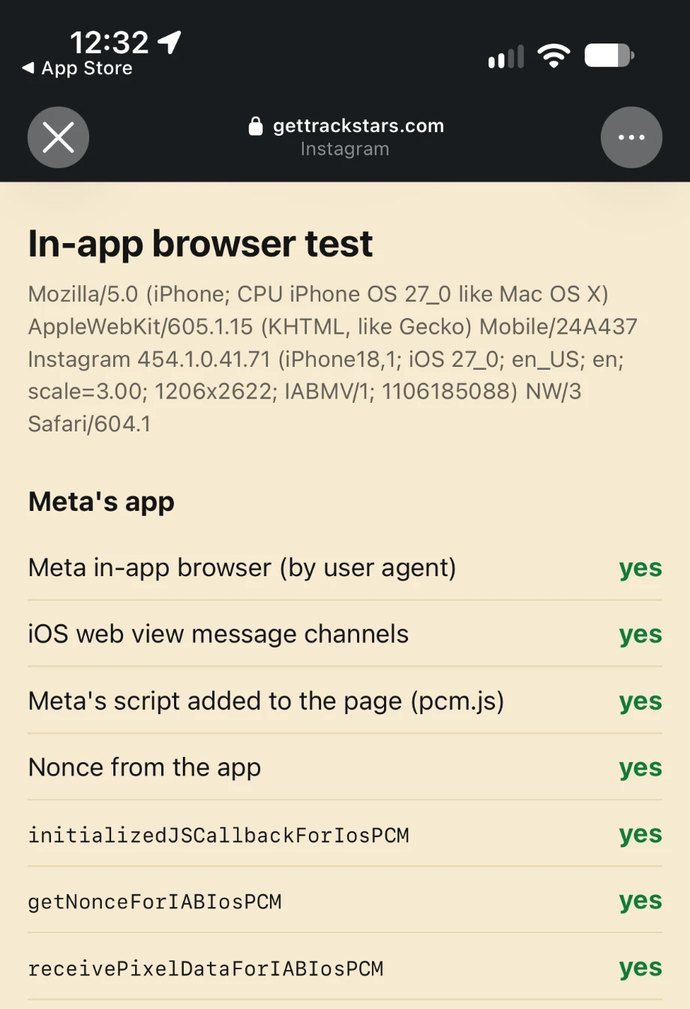
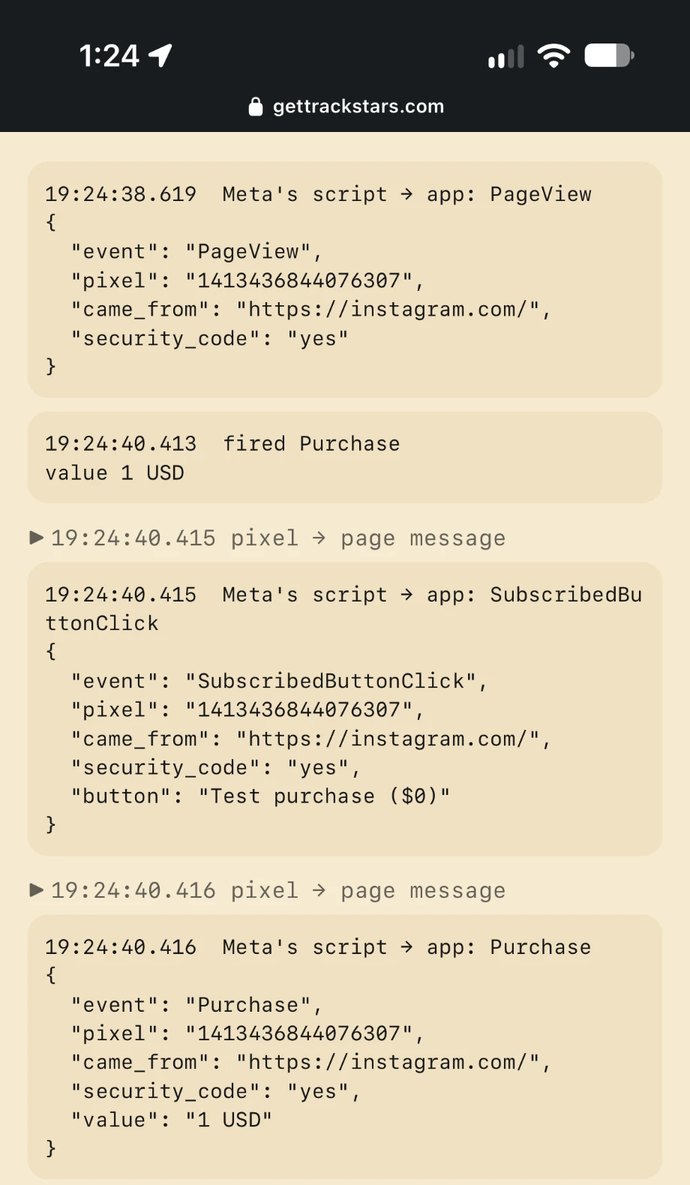
Here’s what’s going on under the hood. Your Meta pixel checks whether the page is open in a web view rather than in a regular browser like Safari or Chrome. On an iPhone, the apps also add a script of their own to the page, called pcm.js, and your pixel loads an extra plugin to talk to it. From then on, every event your pixel fires (page views, add to carts, purchases) goes out twice: once the normal way, from the pixel loaded on your site to Meta’s servers, and once as a message inside the page, which Meta’s script passes into the Facebook or Instagram app on the phone for later transmission. That message carries your pixel ID, the event name, the value, the currency and the products. None of this is new, by the way. Researchers spotted pcm.js back in 2022.
We built a test page with a pixel on it and opened it from Instagram on an iPhone. Meta’s script handed every event to the app: the page view, every button we tapped and our test purchases, with the value and the product. We’d told Instagram not to track us, and the pixel’s normal requests to Meta’s servers still went out, right alongside the copies to the app. Then we switched tracking on and ran the test again. Nothing changed, and nothing on the page showed which choice we’d made. Opting out doesn’t stop the pixel. What it’s supposed to change is what Meta does with the data, and that happens inside the app or on Meta’s servers, where nobody outside Meta can check.
What does "Measure conversions on customer devices" do?
It lets Meta match a purchase on your site to an ad the shopper saw or tapped, on the shopper’s own phone instead of on Meta’s servers. Meta says it uses information you already share, like an email address, and that all it gets back is that a purchase happened and which campaign gets the credit.
Is "Measure conversions on customer devices" on by default?
Yes. Meta’s notice in Events Manager says all eligible pixels will start measuring conversions on customer devices on November 12, 2026. You can switch it off for each pixel in Events Manager.
How do I turn it off?
In Events Manager, go to Data sources, pick your pixel and open Settings, then switch off “Measure conversions on customer devices.” It’s set per pixel, so do it for each one you have.
Will turning it off hurt my ad results?
It can mean fewer iPhone purchases get credited to your ads, since crediting more of them is the whole point of the setting. Meta says your attribution windows and model stay the same either way.
Why does Meta need this if the pixel already sends the purchase?
Meta usually gets the purchase and a click ID through the normal pixel request, but for iPhone users who tapped “Ask App Not to Track,” it isn’t supposed to connect that purchase to their account on its servers. Matching on the phone lets Meta credit the ad and send back only a campaign-level result.
Does Meta's in-app browser get around ad blockers?
Not on purpose. Most ad blockers don’t work inside the Facebook or Instagram in-app browser in the first place, so the normal pixel request usually gets through there. The handoff to the app is about matching people who opted out of tracking, not about getting the event delivered.
Does it send my customers' emails to Meta?
Meta says the matching uses an email you already share with it, that the email stays on the device, and that no identifying customer information from this process is shared with Meta. In our test before November 12, nothing personal crossed into the app: no email, no name, no IP address and no cookies. We’ll check again once the setting rolls out.
Does on-device measurement still need consent?
Treat it like any other pixel event. The data is still collected on your website and sent to Meta’s app. If your pixel only fires with permission, nothing reaches the app without it.
Does it work on Android?
The handoff we found only runs on iPhones, inside Meta’s apps like Facebook and Instagram. The pixel tags visits from Meta’s Android apps too, but we didn’t find the same handoff there, and Meta hasn’t said how the new setting works on Android.
Does it apply in the EU and UK?
No. According to write-ups of Meta’s help pages, it isn’t active for people in the EU or the UK.
Does it replace the Conversions API?
No. Meta says it works alongside your pixel and Conversions API setup. It only adds matching on the device for purchases it can’t otherwise credit.
What is pcm.js?
It’s a script the Facebook and Instagram apps add to every page opened in their in-app browser on iPhone. It passes your pixel’s events to the app. Researchers first spotted it in 2022, and Meta’s comment in the code says it’s there to honor people’s privacy and tracking choices.